If you're searching for CompTIA exam day what to expect, there's a good chance the technical studying is not the only thing on your mind anymore. You might know your ports, acronyms, subnetting shortcuts, or security controls, but the actual exam-day routine can still feel oddly mysterious. Where do you put your phone? How strict is the ID check? Are you allowed to use scratch paper? What happens when the timer starts?
The good news: the Pearson VUE testing center experience is usually predictable. Formal, yes. A little tense, sure. But not chaotic. Once you understand the CompTIA exam check-in process, what to bring to CompTIA exam appointments, how the exam interface works, and what happens after you click submit, the day gets a lot less intimidating.
This guide walks you through the full in-person testing center flow, from the night before to the score report. We'll also touch on related questions people search for, including CompTIA exam dates, CompTIA exam length, exam expiration dates, A+ and Security+ exam day details, and what to do if the day does not go exactly to plan.
CompTIA Exam Day What to Expect: The Quick Answer
On CompTIA exam day, expect to arrive early at the testing center, present valid ID, sign in, store your personal items, review testing rules, sit at an assigned computer, complete a timed exam, and receive a score result when you finish. That is the clean version. The emotional version? You'll probably feel nervous for the first five minutes, settle in once the questions start, and wonder why you spent so much energy worrying about the front-desk process.
CompTIA Exam Day at a Glance
- Arrival: Get there at least 30 minutes early
- ID: Bring valid identification that matches your account name
- Storage: Phones, watches, bags, notes, and most personal items go in a locker
- Exam format: Multiple-choice and performance-based questions
- Timing: Most popular CompTIA exams are timed at 90 minutes
- Results: You normally see a pass or fail result after the exam
The exact details vary by location, country, exam, and current Pearson VUE rules, so always read your appointment confirmation. Still, the general flow is similar across A+, Network+, Security+, CySA+, Cloud+, Linux+, PenTest+, Project+, and other CompTIA certifications.
Before You Arrive at the Testing Center
A smooth exam day starts before you leave home. The biggest mistake candidates make is treating logistics like an afterthought. They study hard, schedule the exam, then realize on the morning of the appointment that their name in Pearson VUE does not exactly match their ID, their voucher is close to expiring, or the testing center is farther away than expected.
Confirm Your Appointment Details
Log in to your Pearson VUE account and verify the exam code, appointment time, address, and delivery type. This matters because CompTIA exam dates are not universal. There is no single "next CompTIA exam" date for everyone. Testing center availability depends on your local Pearson VUE calendar, the exam you selected, and open seats.
If you see people searching for CompTIA exam dates 2024, CompTIA exam dates 2023, CompTIA exam release dates, or next CompTIA A+ exam date, understand what they are really trying to figure out: availability and exam version timing. For current scheduling, your Pearson VUE account is the source that matters. For version changes, check CompTIA exam retirement dates and official exam pages before buying materials or booking a voucher.
Check Your Voucher and Exam Version
CompTIA exam vouchers expire, and that expiration date is serious. A CompTIA exam voucher expired problem is usually not something you want to discover the day before your appointment. Voucher expiration is also different from CompTIA exam expiration, which usually refers to how long a certification stays active after you pass. Most continuing education certifications are valid for three years, while vouchers generally must be used by their own deadline.
Exam versions matter too. CompTIA updates exams periodically, so a phrase like CompTIA exam updates or CompTIA exam development is not just trivia. If you are studying for A+, confirm whether you are taking the current 220-1201 or 220-1202 exams. If you are preparing for Security+, verify the current Security+ code. Outdated study plans built around retired objectives can make an already stressful day worse.
Plan Your Route Like It Matters
Leave early. Then leave a little earlier than that. Parking, building access, elevator delays, and front-desk confusion can burn time fast. Some testing centers are tucked inside office parks or training facilities where the entrance is not obvious from the street. Showing up sweaty, irritated, and five minutes late is not the mindset you want before performance-based questions.
If your exam is early, do a route check the day before. If it is in the afternoon, avoid cramming all morning. A quick review is fine, but trying to learn an entire exam domain in the parking lot usually does more harm than good.
What to Bring to a CompTIA Exam
The safest answer to what to bring to CompTIA exam appointments is: valid ID, your appointment details, and almost nothing else. Testing centers are strict because certification exams are high security environments. You do not want to negotiate about your watch, wallet, notebook, or lucky hoodie five minutes before the exam.
ID Requirements
Bring government-issued identification that is current, legible, and matches the name on your exam registration. Depending on your country and appointment instructions, you may need one or two forms of ID. If your legal name recently changed, fix the account issue before exam day. Do not assume the testing administrator can solve it at the desk.
The name match is where people get burned. "Mike" on your Pearson VUE account and "Michael" on your driver's license might be fine in everyday life, but exam check-in is not everyday life. Use the same name format everywhere. Boring advice, but genuinely important.
What Not to Bring Into the Room
You can bring personal items to the building, but you should expect to store them before testing. Phones, smartwatches, fitness trackers, wallets, bags, hats, notebooks, paper, pens, food, drinks, and study guides typically cannot go into the testing room. The center may provide a locker, and the test administrator may inspect pockets, sleeves, glasses, or other items according to local policy.
Do Not Risk Your Exam Over a Phone
Turn your phone fully off before storing it. Do not check messages during a break unless the testing center explicitly allows it, which is uncommon for certification exams. Accessing personal devices can create an exam security issue, even if your intention is innocent.
The CompTIA Exam Check-In Process
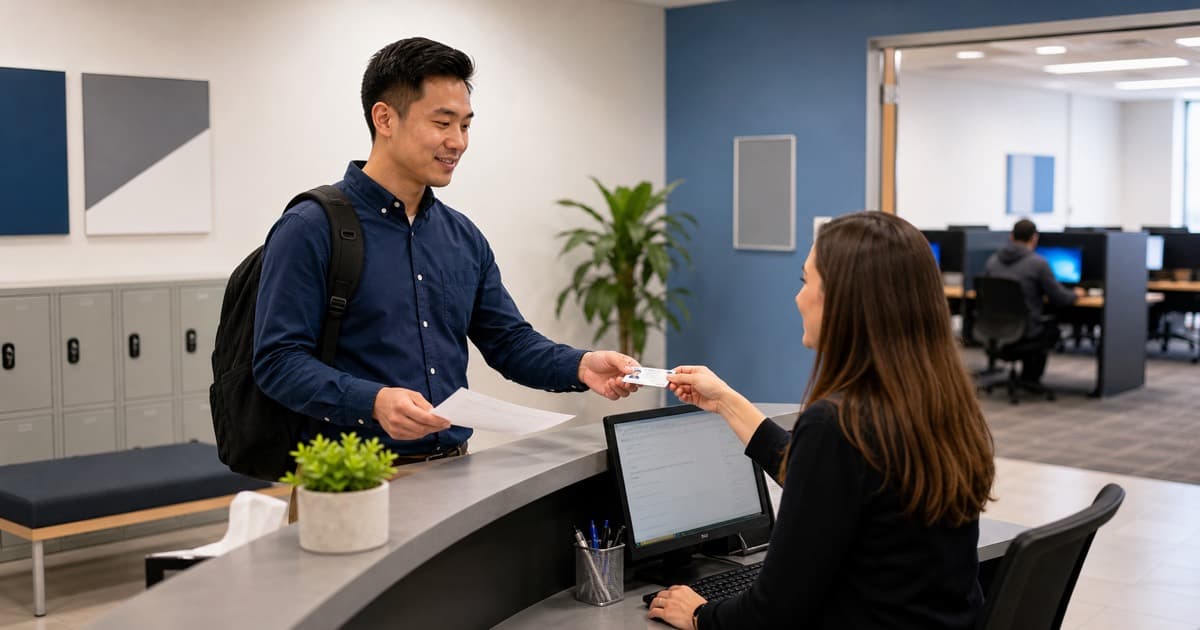
The CompTIA exam check-in process is the part most first-time candidates picture as more intense than it really is. You walk in, identify yourself, show ID, confirm your appointment, review rules, store personal items, and wait until the administrator seats you. That's it. It feels official because it is official, but it is also routine for the people running the testing center.
Step 1: Front Desk Sign-In
At the front desk, the testing center staff will locate your appointment and verify your identification. They may ask you to sign forms, capture a digital signature, take your photo, or confirm exam rules. If several candidates are checking in at once, this part can take a few minutes.
Step 2: Store Your Belongings
Next, you'll place personal belongings in a locker or approved storage area. Keep your ID available if the administrator tells you to, but do not assume you can keep anything else. The quieter your pockets are, the easier this goes. No buzzing watch. No loose notes. No flashcards tucked into a jacket.
Step 3: Rules and Seating
Before you enter the testing room, you'll review the exam rules. Pay attention even if you are anxious. The rules cover talking, leaving your seat, breaks, scratch materials, and what happens if there is a technical issue. When the administrator seats you, they will usually start or unlock the exam at your workstation.
This is also where the Pearson VUE testing center experience feels different from studying at home. You are in a quiet room with other candidates taking different tests. Someone nearby might be taking a nursing exam, a project management exam, or another IT certification. Ignore them. Your screen is the only thing that matters.
Inside the Testing Room
The testing room is usually simple: assigned computer stations, dividers or spacing between seats, cameras, and a controlled environment. Some centers provide noise-reducing headphones or disposable earplugs. If you need them, ask before the exam begins. Once the timer starts, your attention gets expensive.
Scratch Materials
You may receive an erasable noteboard, marker, or other approved scratch material. Do not bring your own paper. Use the provided material for subnetting notes, port numbers, formulas, process steps, or quick memory prompts. If the marker is weak, ask for a new one before you start clicking through questions.
Performance-Based Questions
Many CompTIA exams include performance-based questions, often called PBQs. These can appear near the beginning, although exam layouts can vary. PBQs may ask you to configure a setting, match items, analyze a scenario, complete a simulated task, or arrange steps in the right order. They are a big reason people ask, "is CompTIA exam difficult?"
If a PBQ looks time-consuming, flag it and move on. Seriously. You can come back after collecting easier points from multiple-choice questions. This strategy is especially useful for CompTIA A+ exam day, CompTIA Security+ exam day, and Network+ because PBQs can eat the clock if you let them.
CompTIA Exam Interface and Timing
Once you begin, the exam interface shows one question at a time, a timer, navigation controls, and options to flag questions for review. The interface is not flashy. That is a blessing. Your job is to read carefully, answer, flag when needed, and keep moving.
Is the CompTIA Exam Timed?
Yes, the CompTIA exam is timed. How long does CompTIA exam last? The answer depends on the certification. Many of the most common exams, including A+, Network+, and Security+, allow 90 minutes. CySA+ and some other exams can allow more time. If you are asking how long does CompTIA exam take, include the specific exam code in your research because the CompTIA exam hours are not identical across every certification.
For A+, each core exam has a maximum of 90 questions and a 90-minute time limit. So when people ask how many questions does CompTIA A+ exam have or questions on CompTIA A+ exam, the answer is usually "up to 90 per core." The phrase "up to" matters because the exact number can vary slightly by delivery.
Understanding the Exam Breakdown
Every CompTIA exam breakdown is built around domains. These domains are listed in the official objectives, and each domain has a percentage weight. If a domain is 25% of the exam, expect it to show up a lot. Not necessarily in obvious ways, either. One scenario can test networking, security, troubleshooting, and operational judgment at the same time.
This is why practice exams matter. Reading objectives is useful, but answering mixed questions under a timer teaches you how CompTIA phrases things. If you are still early in preparation, our CompTIA A+ practice tests guide and Security+ practice tests guide can help you build a smarter review routine.
Is the CompTIA Exam Easy?
Is CompTIA exam easy? For some candidates, yes. For most, not exactly. The better question is whether the exam is predictable once you prepare properly. It is. The difficulty comes from scenario wording, PBQs, similar answer choices, and time pressure. If you know the objectives and can apply them, the testing center itself is not the obstacle.
If you are still trying to decide whether the effort is worthwhile, read our guide on whether CompTIA A+ is worth it or our broader CompTIA certification path breakdown. CompTIA exam progression makes more sense when you know the role you are aiming for.
A Simple Timing Strategy
Do a quick first pass. Answer what you know, flag anything that needs deeper thinking, and avoid spending ten minutes on one question. If you have PBQs at the start, scan them, complete the ones you understand, and come back to the messy ones after the multiple-choice section.
Breaks, Results, and What Happens After
Break policies are one of those details candidates often ignore until they need one. In many CompTIA testing center situations, the timer keeps running if you take an unscheduled break. You may also need to sign out and back in. That means a bathroom break can cost more time than you expect.
Use the Restroom Before Check-In
Basic? Yes. Worth saying anyway? Absolutely. Use the restroom before the final check-in if you can. Eat something steady before you arrive, but do not overdo caffeine. Exam adrenaline plus too much coffee is not exactly a performance enhancer.
Submitting the Exam
When time runs out or you choose to finish, the exam ends and you usually complete a short survey before seeing your result. The wait between submit and result can feel much longer than it is. Then the screen tells you whether you passed or failed.
If you pass, enjoy the moment. You earned it. Your official record should appear in your CompTIA account after processing. If you fail, take the score report seriously but do not catastrophize. Many capable IT professionals fail once and pass later. Our CompTIA exam retake policy guide explains the waiting period, retake cost, and next steps.
Certification Expiration Dates
After passing, keep track of CompTIA exam expiration dates and certification renewal requirements. People use phrases like CompTIA exam expire, CompTIA exam expiration, and CompTIA exam expiration dates in slightly different ways. The exam version can retire, your voucher can expire, and your certification can expire after the renewal cycle. Those are three different clocks.
For renewal details, see our guide on how to renew CompTIA certifications. It is much easier to track continuing education credits from the beginning than to scramble near the deadline.
Common CompTIA Exam Day Mistakes
Most exam-day problems are preventable. Not all of them, of course. Computers freeze. Traffic happens. Testing centers occasionally run behind. But the big candidate-controlled mistakes tend to repeat. Avoid these and your day gets cleaner.
Arriving Late
Late arrival is the most avoidable disaster. Testing centers run schedules tightly, and being late can mean losing your seat and your voucher. Treat the appointment like a job interview where the interviewer is a clock.
Using Outdated Study Information
Old forum threads about CompTIA A exam dates, CompTIA exams dates, or CompTIA x exams can be useful for general context, but not for current exam planning. Always verify the current exam code, objectives, and retirement timeline. A quick check can save weeks of studying the wrong material.
Ignoring PBQs Until Exam Day
Performance-based questions should not be a surprise. If your first time seeing simulated tasks is at the testing center, the exam will feel harder than it needs to. Practice hands-on labs, command-line tasks, troubleshooting flows, and configuration logic before the appointment. Our Security+ labs guide is a good starting point if you are working on cybersecurity exams.
Trying a Miracle Cram
Searches like CompTIA A+ 3 day prep and CompTIA Security+ 9 days are popular for a reason. People get busy, deadlines sneak up, and the voucher clock starts looking unfriendly. A short final review can help, but miracle cramming is risky if you do not already have the foundation. If you are under serious time pressure, be honest about whether rescheduling is smarter.
Letting Anxiety Drive Your Strategy
Anxiety makes people rush, second-guess, and abandon their plan. Before the exam, decide how you will handle hard questions: read once, eliminate obvious wrong answers, choose if confident, flag if not, move on. A plan is not magic, but it keeps one strange question from hijacking the next twenty.
When Exam Day Feels Like Too Much
If your bigger problem is not knowledge but time, pressure, or repeated exam anxiety, you are not the only one. We help busy IT professionals with CompTIA A+ exam assistance, Network+ help, Security+ support, and other certification needs when the usual study route is not working.
Frequently Asked Questions
Frequently Asked Questions
Final Thoughts on CompTIA Exam Day
CompTIA exam what to expect questions usually come from a very human place: you want fewer surprises. That is reasonable. The actual testing center routine is structured, security-conscious, and manageable when you arrive prepared. Bring the right ID, show up early, store your belongings, understand the timer, and use a calm question strategy.
If your search started as a scattered CompTIA exam FAQ, with tabs open for "is CompTIA exam hard," "is CompTIA exam difficult," "next CompTIA exam," "CompTIA exam dates 2023," or "how many questions does CompTIA A+ exam have," bring it back to the basics: current objectives, current schedule, valid ID, enough practice, and a realistic timing plan.
The exam itself still has to be earned. But exam day should not be the mystery. Whether you are walking into CompTIA A+ exam day, CompTIA Security+ exam day, or a more advanced certification, the process is mostly the same: check in, focus, manage the clock, and finish cleanly.
And if you are looking at your calendar thinking the timing, pressure, or retake risk is just too much right now, reach out to ComptiaHelp. We'll help you find the most practical path to the result you need.